Know exactly when
you're working overtime.
ShiftLog runs quietly inside VS Code, tracking your real coding activity and git commits against your actual work schedule - so overtime is measured, not guessed.
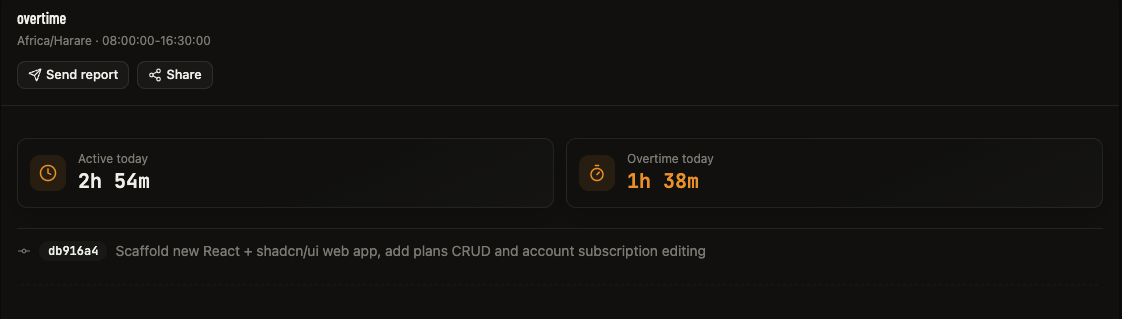
Schedule-aware overtime
Weekdays, a Saturday half-day, Sundays off, and public holidays are all built in and configurable from your profile - with a visual calendar for holidays.
Any git host, or none
Commits are tracked locally regardless of whether the repo is pushed to GitHub, GitLab, or nowhere at all.
AI-summarized reports
Daily and weekly reports land in your inbox with a DeepSeek-generated summary of what you actually worked on.
Offline-first sync
Activity is recorded locally the moment it happens and queued for sync - lose your connection, not your progress.
Multi-machine, one timeline
Open the same project from a laptop and a desktop and ShiftLog consolidates the totals into a single, accurate record.
Live analytics dashboard
Streaks, churn, hour-of-day heatmaps, and a per-day drilldown timeline of exactly when you were active.
How ShiftLog compares.
Most activity trackers stop at "time spent." ShiftLog was built specifically to answer one question: how much of that was overtime.
| Capability | ShiftLog | Other trackers |
|---|---|---|
| Schedule-aware overtime (hours, weekends, holidays) | ✓ | ✕ |
| Tracks commits on any git host, or none | ✓ | partial |
| AI-summarized daily/weekly reports | ✓ | ✕ |
| Offline-first local recording | ✓ | ✓ |
| Multi-machine consolidation into one timeline | ✓ | partial |
| Self-hosted option | ✓ | ✕ |
"I built ShiftLog because I was tired of guessing my own overtime. Every other tracker showed me hours spent, but none of them knew my actual work schedule - so none of them could tell me what was overtime and what wasn't. ShiftLog does."
Blessed Mutengwa - creator of ShiftLog
Simple pricing.
Start free. Upgrade whenever you outgrow it.
- Up to 2 tracked projects
- Last 30 days of history
- Daily overtime email report
- Full live dashboard
or $45/yr — 2 months free
- Unlimited projects
- Complete all-time history & analytics
- Daily + weekly AI-summarized reports
- Report & project sharing links
- Priority support
Questions, answered.
Is this really self-hosted? Where's my data stored?
ShiftLog's backend runs on infrastructure the founder controls, not a third-party analytics platform. Your activity and commit data live in a Postgres database on that server - it isn't sold or shared.
How is overtime actually calculated?
Each account configures a real work schedule (weekday hours, an optional Saturday half-day, Sunday off, and public holidays) from their profile. Any coding activity outside that window counts as overtime - it's measured against your schedule, not an arbitrary daily total.
Does it work with any git host?
Yes. Commits are read directly from your local repository via VS Code's built-in git integration, so tracking works whether you push to GitHub, GitLab, a private server, or nowhere at all.
What happens if I go offline?
Activity is written to a local queue the moment it happens and only cleared once the server confirms it was received. Lose your connection and nothing is lost - it syncs automatically once you're back online.
Can I use this across multiple machines?
Yes. Open the same project from a laptop and a desktop and ShiftLog consolidates both into a single, accurate timeline instead of splitting your totals.
What data does the AI summary see?
Only the structured stats for the report being generated (time breakdown, commit messages, and diff stats) are sent to the summarization model - never your source code.